Wednesday, 24 June 2015
50 REALITIES ABOUT INDIA THAT SURPRISE TOURISTS

Wednesday, 27 May 2015
HOW TO CHECK AND UPDATE THE CHROME BROWSER?
Good evening friends!
Updates are important for any kind of software. The GOOGLE CHROME browser is no exception. In fact, it is very important to use an up-to-date browser always. I think most of you know the updating process of your Chrome browser. However, there are also some beginners, who still needs this post. So, let me share about it here.
- Open the Google Chrome browser.
- In the top-right corner of the browser window [near the right side of the URL textbox], there will be a CUSTOMIZE AND CONTROL GOOGLE CHROME menu icon as shown below. Click that icon.

- Now a menu list appears. From that, click SETTINGS option.
- Now a new tab opens with the browser settings. In the left side, click on the ABOUT option [under CHROME].
- Now, the browser will automatically check for updates and displays the result. If you are getting an error message "UPDATES ARE DISABLED BY THE ADMINISTRATOR", fix that error.
- If your browser is up-to-date, it will displays "GOOGLE CHROME IS UP TO DATE".
- If an update is available, it will download and install the new update [it will take several minutes depending upon the speed of your PC and internet connection] and displays "NEARLY UP-TO-DATE! RELAUNCH GOOGLE CHROME TO FINISH UPDATING".
- Below that message, a RELAUNCH button will be there. Click that button. The browser will automatically restart.
That's all. Now you have updated your Chrome browser to the latest version. You can see the current version there.
Just try it now [it's advised to close all oter tabs in your browser, while doing these].
Thanking You!
HOW TO FIX "UPDATES ARE DISABLED BY THE ADMINISTRATOR" ERROR IN CHROME?
Hello! Good evening friends!
Will you periodically check whether your GOOGLE CHROME browser is up-to-date!? Do you know how to check and update the CHROME browser?
Well! Sometimes, due to certain changes in your PC, you will get a message "UPDATES ARE DISABLED BY THE ADMINISTER". I faced such a situation just before sometime. So, I am going to share with you the way to fix this error.
Basically, this will be due to certain interfaces in your registry settings of Google Chrome. This will be due to the installations of some unwanted softwares in your computer. So, what we are going to do is to fix those changes in the registry settings of Google Chrome browser in your PC.
- Click the start button and open the RUN command box.
- In the OPEN text box, type regedit.
- Click the OK button.
- Now the REGISTRY EDITOR window opens.
- In the left pane, double-click to expand the HKEY_LOCAL_MACHINE.
- From the expanded list, open the SOFTWARE.
- Under that, open the POLICIES and then expand the GOOGLE.
- Under the GOOGLE, double-click the UPDATE.
- Now, a list of options will be displayed in the right-pane. In that, double-click the UPDATEDEFAULT [Update Default] option.
- A box appears with an option VALUE DATA.
- Due to the changes, that value will be changed to 0 [zero]. Now change that value from 0 to 1 [one] and click the OK button.
- Now close the Registry Editor and the Chrome browser [if it is open]..
- Re-launch the Chrome browser and the automatic update will be enabled now.
Okay dear friends! Just give it a try now because PRACTICE MAKES A MAN PERFECT.
Thanking You!
Friday, 22 May 2015
HOW TO SELECT MULTIPLE FILES AT ONCE IN WINDOWS PC?
Hello friends! Good evening!
This post is about a basic feature in the Windows Operating Systems by the Microsoft. I think still it helps some of the beginners.
As the title suggests, this post is about selecting multiple files at once. We need this feature. Right!? While copying, moving or deleting files, we surely need this feature for saving our time. Microsoft understood this and provided a simple way in its Windows Operating Systems. Let's see how.
- Select the first file.
- Now PRESS AND HOLD the Ctrl key [i.e., the CONTROL KEY] in your keyboard.
- Now holding the Control key, select as much files as you need.
That's all you had to do. Now all those files will be selected. Just give it a try.
 |
| CONTROL KEY |
Thanking You!
HOW TO DELETE FILES WITHOUT SENDING IT INTO THE RECYCLE BIN?
Hai friends! Good evening! Really a cloudy day!
Everybody know that the Windows Operating System of Microsoft is the top computer operating system in the world today. Today, we all deal many files in Windows. As a safety feature, Microsoft's Windows Operating System sends the deleted files into the Recycle Bin in order to prevent accidental deletion of important files. Afterwards, you have to Empty Recycle Bin. Sometimes, this will be irritating. Isn't it!?
 |
| RECYCLE BIN |
But the OS (Operating System) also enables you to disable this feature and delete the files permanently. Today I am going to blog about that. Well! There are two methods. Among these two, I personally recommend the second method.
METHOD 1 (unsafe) :
- In the DESKTOP, single click the RECYCLE BIN to select it.
- Then RIGHT-CLICK the Recycle Bin. [Now, a pop-up menu appears with a list of options]
 |
| RIGHT-CLICK |
 |
| RECYCLE BIN OPTIONS |
- In the displayed pop-up menu, click PROPERTIES. [Now the Recycle Bin Properties window opens]
 |
| RECYCLE BIN PROPERTIES |
- Inside that, there will be a RADIO BUTTON (Don't move files to Recycle Bin. Remove files immediately when deleted.)
- Click that radio button to enable that option.
- Click the APPLY button.
- Now click the OK button. [After this, while deleting a file, it will not be send to the Recycle Bin. It will be permanently deleted.]
METHOD 2 (safe):
- Click the file which you want to delete. [You can also select multiple files at once]
- RIGHT-CLICK the file(s). [The pop-up menu appears]
|
| RIGHT-CLICK |
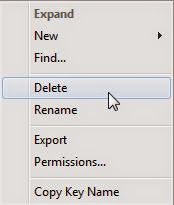
- Now holding the SHIFT KEY on your keyboard, click DELETE.
 |
| SHIFT KEY |
 |
| DELETE OPTION |
- You can also hold the SHIFT KEY and press the DELETE KEY on the keyboard itself.[After this, the particular file(s) only are deleted permanently]
 |
| DELETE KEY |
I personally recommend the second method to avoid any accidental deletion. Okay friends! Try it on your own.
Thanking You!
Wednesday, 20 May 2015
HOW TO FIND THE MEANING OF A WORD?
Hello! Good evening friends!
In my olden days, dictionary was the main source of my knowledge. Now also I could say that the illustrated Oxford dictionary was the basic of my knowledge. I used those photographs to imagine "how the four strokes of the engine works?", "how the radar system works?", etc. On that days, there was no internet access for me.
Now, I have internet access and everybody could see that Oxford dictionary with dust, in the cupboard. Poor dictionary. Okay! Now I am going to share with you, "how I use Google to find the exact meaning of a word, along with its translations?"
The procedure is very very simple with the powerful search engine, Google!
- Open your web browser.
- Type "https://google.com" in the address bar.
- In the search box, type "define:<the word to be searched>". [For example, to search the meaning of the word google, type define:google].
- Now press the "Google Search" button.
- Now, at the top of the search results page, there will be a box with the following details of the word.
- pronunciation [along with voice]
- meanings [usage as noun, verb, etc]
- origin
- translation to various languages
- use over time [in the form of a graph]
So simple! Isn't it!?
Then what are you waiting for? Give a try!
Thanking You!
HOW TO CREATE A STRONG PASSWORD?
Hello friends! A little sunny day today!
SAFETY AND PRIVACY are the main expectations towards any website. Currently, passwords are primarily the key feature to preserve them.
Everyone of us is using so many passwords today. Right? For us, it looks like a safe one. But always remember hackers may try to mess with you at any time. So, be sure to create a strong password and change it at least once in three months.
Okay! Shall we discuss some basic tips on how to create and maintain a strong and secure password!?
Below are some tips from me.
- Never ever use short passwords. Make it a little long{for that, don't create a paragraph}. I recommend a "MINIMUM 12 CHARACTER" password.
- Avoid using regular words.
- Make sure that your password does not contain any of your personal information{like names, date of births, places, pets' name, favorite items, etc}.
- Mix upper case, lower case, numbers and symbols.
- Change your passwords periodically.
- Do not share your email id or phone number with strangers.
- Try to avoid using password protected accounts in public internet points or in others' devices{friends' mobile, relatives' PC, etc}. Technology has grown and there are a lot of spy software.
- In case if you entered your password in any other devices, change your password as soon as you access your own device.
- Always be sure to log out all your accounts.
- Try to avoid checking the tick mark in the "KEEP ME SIGNED IN" check box.
- If available, activate the notification for unrecognized login to your accounts.
- Clear the browsing data{particularly cookies} from your web browser after handling any accounts.
- Do not use any common dialogues.
- Do not write your password anywhere for remembering. Just use your memory power only.
- Avoid using same passwords for all accounts. This is because if one of your account is hacked, then others also can be hacked.
- Even if it is your life partner, I recommend not to share your passwords with her/him[your choice]. Because, tomorrow will not be the same as today or yesterday.
The above are only basic tips from me. You must always be alert while handling passwords.
That's all! Be safe!
Thanking You!
Tuesday, 19 May 2015
HOW TO MAINTAIN A SMARTPHONE'S DISPLAY?
Hello friends! Good morning!
Most of you are using smartphones. Right? As we all know, the display is the most important part in such phones [in fact all the phones].
Is your touchscreen very dirty!? Maybe! not only you. Everybody's phone is that like only.
Your screen is primarily getting dirty due to those fingerprints, which is mainly due to crazy gaming. also, there will be some scratches due to minute dust present in the fingertips. All the newly bought products are well maintained at first. but later, when we get bored, the entire appearance of the product will be changed. So, can we discuss about how to maintain your touchscreen.
- The first step is ALWAYS BE AWARE ABOUT YOUR TOUCHSCREEN.
- Always protect your phone with a proper and good quality screen-guard.
- Be sure to clean your hand, particularly your fingers before touching the screen. This is because there will be minute dust particles in your hands, which when rubbed against the screen may cause scratches.
- Clean your screen-guard periodically.
- Also, daily clean your screen with proper microfiber cloth. Use distilled water or any other recommended cleaning agents.
- Don't press too hard on the screen. Always consider your screen as an egg shell.
- Don't directly spray any liquids on the screen to prevent any leakages. Just spray it on the cloth and gently clean the screen.
- Avoid tissue papers and ordinary papers since they contain wood fibers, which may cause scratches on the screen.
- Always remember that OUR PHONES ARE SWITCHED ALWAYS SWITCHED "ON" [24 X 7 HOURS IN A WEEK]. So, please give periodic rests. At least turn if "OFF" when you are sleeping. Thereby you give it a chance to cool down and restart.
- Give a PAUSE and a rest of at least five minutes to your game once in half an hour. This will protect your eyes and your phone's screen.
Touchscreens are like your eyes. Protect them. Then it will show you an amazing display.
[I didn't inserted any images here {to avoid slower loading}]
Thank You!
Wednesday, 22 April 2015
RAIL ENGINES
Hello! Good morning friends. A nice and cold morning today!

Okay! Today shall we discuss about rail engines!? Yes. The rail engine that pulls us to different locations. Do you know anything about rail engines? Some peoples may know something. But most of the peoples [like me] don't know much about the rail engines. On the last Monday (20 - 04 - 2015), an article was published on the "DAILY THANTHI" newspaper about the rail engines. After reading that, I found it useful. So, I like to share the same with you people also.
I think all of you have seen some characters written in the front side of the rail engines [like WDG 2, YDM 2, etc...]. This is a symbolic representation about the type of that engine.
Types of railway tracks are commonly seen are Broad Gauge (BG), Metre Gauge (MG), Narrow Gauge (NG) and Narrower Gauge.
The first letter on the rail engine represents the type of railway track it runs. How!?
- "W" represents Broad Gauge
- "Y" represents Metre Gauge
- "Z" represents Narrow Gauge
- "N" represents Narrower Gauge
The second letter on the engine represents the type of power source it uses. How!?
- "D" represents diesel engine
- "A" represents electric engine
- "C" represents the capability of running in DC electricity
- "CA" represents the capability of running in both AC and DC electricity
- "B" represents battery powered engine
The third letter on the rail engine represents the purpose of that engine. How!?
- "G" represents goods train engine
- "P" represents passenger train engine
- "M" represents engines used for trains carrying both goods and passengers
- "S" represents shunting engine
- "U" represents DMU / MEMU
- "1" represemts 1000 HP
- "1A" represents 1100 HP ("A" symbolizes 100)
So, shall we see some examples!?
WDG4 symbolizes a rail engine powered by diesel running through broad gauge with a horse power of 4000 HP.
YDM2A symbolizes a rail engine powered by diesel running through metre gauge with a horse power of 2100 HP.

Isn't it so easy!? Okay try it yourselves.
Thank You!
Thursday, 4 September 2014
TEACHERS' DAY
HAPPY TEACHERS' DAY!
Hello Friends!
Teachers' day is a special day to appreciate the teachers.
The date on which it is celebrated differs for different countries. In India, the teachers' day is being celebrated on every September 5. Yes! Tomorrow is our teachers' day.
Do you know what is special about teaching? "TEACHING IS A PROFESSION THAT TEACHES ALL OTHER PROFESSIONS". I saw this somewhere. But in my point of view, teaching is not a profession. It's a service. Only a teacher can change the future of a country. That is why Indians used to respect their teachers with great respect.So every teacher must work hard with dedication.
We should not allow education to become a business in our country! It is very shameful that most of the Indian schools nowadays are considering education as a business. I think nowadays the holiness of schools had faded away. Also, nowadays most of the teachers are not getting enough respect and shamefully some of them are not worth to be respected. All this is because of our rush towards money.
Luckily, our government is now trying to restore our culture and provide good and compulsory education to all children. It's also our duty to coordinate with our government. Always be against child labor.
In the past, all other countries learnt the art of schooling from India. But nowadays, we are in a level that we have to it learn from others. We have to join hands to change this.
As students, what are we doing to our nation!? We enjoy all the benefits from our government, and then work for other countries. In Facebook and somewhere, I have seen a post many times. "Obama asks Bill Gates why he is recruiting many Indians in his company. He also explains that if those placements were given to Americans, then there will be no unemployment in their country. Bill Gates replies that if he would have given those placements to Americans, then there will be another Microsoft company in India. Is this a honor to us!? Shamefully No! We have to reveal our powers. Before blaming our government, let's ask ourselves "What we contributed to our nation!?" No political parties can transform our nation. Only we could do that!
I kindly ask all the parents and most importantly the teachers to sow the seeds of patriotism also in our children's mind.
And do you know who is the most respectful person for you in your life!? Those teachers who taught you the languages in your Kindergarten. Yeah! If we don't know to read or write a language, then how will we gain knowledge!? So, they are the most important ones in our life.
A teacher's love can be called as the Universal Love! He/She never expects back anything from you, except your development and betterment.
Actually it's our duty to pray for them everyday! At least we must pray for them tomorrow!
Okay! How are you going to celebrate the teachers' day tomorrow? Share your ideas here as COMMENTS!
Thank You!
Tuesday, 26 August 2014
HOW TO INCREASE DOWNLOAD SPEED?
 |
| DOWNLOAD SPEED |
Hello friends,
Nowadays we use internet for downloading various types of information, images, videos, audios, etc. If we have a high speed internet connection, this will be a pleasant task. Other than that, we can also increase the download speed a little by just doing some changes in the computer itself. Let's see how!
- Open START menu and click RUN option. The RUN dialog box appears.
- In the OPEN text box, type gpedit.msc and then press the ENTER key.

RUN GPEDIT.MSC
- Now, the LOCAL GROUP POLICY EDITOR window opens.
|
| RUN GPEDIT.MSC |
 |
| LOCAL GROUP POLICY EDITOR |
- In the left pane, click the ADMINISTRATIVE TEMPLATES option.
 |
| ADMINISTRATIVE TEMPLATES |
- Now a list of options appear in the middle pane.
- In that, double click the NETWORK option.
- Now from the list of options that appear, double click the QoS PACKET SCHEDULER option.
 |
| QoS PACKET SCHEDULER |
- Now from the options that appear, double click the LIMIT RESERVABLE BANDWIDTH option.
 |
| LIMIT RESERVABLE BANDWIDTH |
- Now a new window appears. Click ENABLED radio button.
- Under that, change BANDWIDTH LIMIT % to 0.

- Now, the computer asks whether to RESTART the system. Choose YES.
 |
| COMPUTER |
NOTE : This does not works for WINDOWS XP HOME EDITION
Thank You!
Monday, 25 August 2014
RESTORING FILES FROM A VIRUS AFFECTED PEN DRIVE
 |
| PEN DRIVE |
Hello friends,
Nowadays, most of us use pen drives to store data. But, due to the usage of our pen drive in various computers, most of us face threats due to viruses. Sometimes, the files in the pen drive will be hidden. But when we view the PROPERTIES, it shows that there are files.
This is because the viruses are hiding our files. If there are no important files, we can simply FORMAT the pen drive. But if there are important files hidden by the virus, then we have to make them visible to prevent data loss. Okay now let's see how to do that. It does not need to install any special software to do this job. The solution is in your computer itself. How!!!?
Let's see.
- First of all, insert your pen drive into your computer.
- Go to MY COMPUTER and find the drive letter for your pen drive [for example DRIVE H:].
- Now go to START=>RUN. Now the RUN dialog box appears. In the OPEN text box, type CMD and press the ENTER key in your keyboard. The Command Prompt Window appears.
- Now, if your pen drive's drive letter is H, type H: and press the ENTER key.
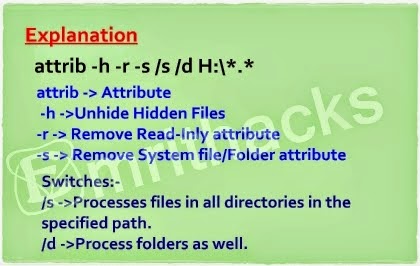
- Now type attrib h s r/s/d/*.*
- Type exactly as above with the correct spaces.
- After typing the above correctly, press the ENTER key.
- Wait for a few seconds and then open your pen drive in MY COMPUTER. Now your files will be visible!
 |
| VIIRUS REMOVING |
Thank You!
Sunday, 24 August 2014
HOW TO CALCULATE THE NUMBER OF FRUITS INSIDE A JACKFRUIT?
 |
| JACKFRUIT TREE |
Can you count the number of Jackfruits in this tree? Your answer will be "YES". Because you can see how many fruits are in this tree.
Now if I ask you whether you can count the number of fruits inside each Jackfruit without cutting it, what will be your answer. Mostly your answer will be "NO". Before August 16, 2014 my answer was also the same. Oh! Then what happened to me on that day!? You wanna know? Okay then continue reading.
Tamil Nadu's number one selling newspaper Daily Thanthi plays a main role in developing the knowledge of the people here. With that, a weekly publishment called Muthucharam (முத்துச்சரம்), meaning "the pearl string" is being published. On August 16, 2014 I came across an article about Jackfruit in that publishment. In that, there were many interesting fact about Jackfruit. And one of them is the trick to know the number of fruits inside a jackfruit.
 |
| JACKFRUIT |
Jackfruit has been described in many places in the Thamizh literature. In Kanakkadhikaaram (கணக்கதிகாரம்), a mathematical text in Thamizh, the trick to find out the number of fruits inside the Jackfruit was being described. I am sharing with you the trick below.
 |
| THORN LIKE PROJECTIONS ON JACKFRUIT |
We all know that the Jackfruit contains thorn like projections all over its surface. This becomes softer as the fruit ripes. Okay now these thorns are going to help us in this job.
 |
| JACKFRUIT THORNS |
- The first step is to carefully count the number of thorns in the first row. [I mean only the thorns around the stalk.]
- The second step is to multiply that number with 6/5.
Okay the answer gives the number of fruits you are going to taste!
பலாவின் சுளையறிய வேண்டுதிலேல் ஆல்கு
சிறுமுள்ளுக் காம்பரு எண்ணி வருவதை
ஆறிற் பெருக்கியே ஐந்தனுக் கீந்தியே
வேறெண்ண வேண்டாஞ் சுளை
- கணக்கதிகாரம்
Okay friends! I think there will be lot more in the Indian literature. So, it's our duty to reveal them to the world and preserve them!
Thank You for reading this post.
Friday, 15 August 2014
AbOuT mE
 |
| VAISAKH |
Hello!
I am Vaisakh from India!
In this day of Independence, I am posting my first entry into my blog. I am currently doing my Bachelor's degree in Mechanical Engineering. I am not brilliant. But I can also share something useful. Okay! From today, we will be sharing almost everything here.
Thanking You!
Subscribe to:
Posts (Atom)